
The best action cameras for cyclists let you capture your rides, whether you’re creating content for social media or simply keeping a record in case something goes wrong on your ride.
However, choosing the best action camera for cycling isn’t always straightforward, since there are a huge number of options, formats and features available to choose from. Ideally, you want a camera that’s easy to use while on the go, either mounted to your bike or worn on your body, and that offers enough battery life to last the length of your ride.
Effective image stabilisation is also important, and depending on what you plan to do with your footage, there are several other features you might want to look out for. Let our action camera jargon buster make it easier for you. Meanwhile, some cameras can even double up as one of the best bike lights, so be sure to give that some consideration.
Once you’re back home, you might enjoy spending time editing your footage to create the perfect video, or perhaps you’d prefer to simply download the clips and make minimal adjustments to keep a record of the ride. Some action cameras come with extensive editing software, while others offer little to none, and a few focus on quick and simple editing directly from your phone.
Keep reading for our picks of the best action cameras for cyclists. If you’re not sure which is the best kind for you, then there’s plenty of help available in our How To Choose section. We also have a safety camera vs action camera guide, in case you’re questioning which kind is best suited for your needs.
Last updated 02nd April 2026 Added the Insta30 Go Ultra, Oakley Meta Vanguard and Hoverair X1 Pro to the guide, plus updated products to newer versions that have launched, checked specs and availability, and added buying criteria.
Best action cameras for cycling
You can trust Cyclingnews Our experts spend countless hours testing cycling tech and will always share honest, unbiased advice to help you choose. Find out more about how we test.
Best action camera for cycling

Much like the smaller Go cameras, the Insta360 Go Ultra uses a mothership-style body that can operate on its own, or with the detachable camera pod acting as a remote unit while the main body functions as the hub.
The camera pod is slightly larger than the one on the excellent Insta360 Go 3, but it’s still much easier to clip or mount to different surfaces than the larger cameras from GoPro or DJI that we’ve tested. You also benefit from improved battery life, higher resolution and better low-light performance compared to the Go 3, along with a handy flip-up screen for framing, and a wide range of accessory options.
Beyond the specs, the Go Ultra is small enough to be almost unnoticeable when riding. We’ve used it with the magnetic pendant and the stabilised footage is impressive considering there’s no need for a bulky chest harness. The same goes for helmet mounting, in that it’s easy to forget it’s there while you ride.
The master/slave setup also makes it far simpler to frame POV shots and experiment with different angles, as you don’t have to rely on using an app for positioning. It saves a surprising amount of time and hassle, which is why it’s become our preferred setup for filming while riding.
Best for video quality

The Ace Pro 2 is Insta360’s flagship action camera, offering modest upgrades in image resolution and battery life over the previous generation, while packing in all the features a keen content creator or professional might want. Compared with Insta360’s 360 cameras, modular designs or ultra-compact models, the Ace Pro 2 follows a more traditional action camera layout, although it still includes some clever design touches and class-leading stabilisation.
The Insta360 Ace Pro 2 doesn’t reinvent the category, but it refines the experience in meaningful ways. Yes, it can record in 8K, although that will likely be more than most riders need. While other cameras also offer editing apps and accessory ecosystems, the Ace Pro 2 stands out for how seamlessly it brings those tools together into one accessible package. It isn’t completely flawless, though, and there are still small improvements that could be made, but overall it delivers an impressive shooting experience. You can record yourself with clear audio, experiment with creative angles, and capture cinematic footage when inspiration strikes, before quickly turning it into a polished edit on your phone, ready to share.
The Insta360 ecosystem also includes a wide range of accessories, from external microphones and cold shoe mounts to GPS remotes. It’s available with numerous mounting options too, although the camera uses a magnetic mounting adapter rather than the traditional finger-style mount or threaded tripod mount. That means mounting it to handlebars, helmets or chest harnesses involves an extra step, but there’s still a huge selection of compatible mounts available.
It’s a relatively expensive option, which is why we’d recommend it primarily for professionals or serious creators who want the extra image quality and features.
Check out our full review of the Insta360 Ace Pro for more details.
Best for compact 4K

GoPro has managed to pack its technology into a smaller and lighter package with the Hero. It weighs roughly half as much as the Hero13 Black but can still shoot 4K video at 30fps. Operation has also been simplified, which is helpful when you’re riding. We think it’s a good beginner-friendly option, although riders may eventually find its feature set a little limited.
The lens is protected by a replaceable, water-repellent cover, and the built-in mounting fingers make it easy to attach beneath an out-front computer mount. The Hero uses a single rear touchscreen and offers wireless connectivity to an optional remote, along with voice control.
When charging, the Hero can automatically upload footage to the cloud, and GoPro’s automatic editing can generate a highlights video sent straight to your phone.
There are some compromises to be aware of, though. Most notably, the battery isn’t swappable, with GoPro claiming a runtime of up to 90 minutes. The Hero also lacks TimeWarp video and several other advanced shooting modes, and you can’t attach a wide-angle lens. There’s no built-in image stabilisation either, with stabilisation instead applied later during editing.
Read our GoPro Hero 4K review for more details.
Best for 360 footage

If you’ve marvelled at the exploits of Safa Brian, there’s a good chance they were filmed with an Insta360 camera. The Insta360 X4 remains available, although it has now been succeeded by the X5. The newer model offers similar video quality and frame rates but adds replaceable lenses, improved low-light performance and clearer audio. DJI also claims a longer runtime of up to 208 minutes.
We rated the Insta360 X4 highly for its ease of use, both while filming and during post-ride editing. It records in full 360 degrees, allowing you to reframe the footage later to include (or exclude) yourself, depending on how the ride looked.
Insta360’s editing software is one of its major strengths. It allows you to wirelessly connect and quickly frame, trim and export your footage on both a computer and a phone. After editing, you can still produce 4K video.
Another advantage is how easy the camera is to use while on the move. You can keep it in a jersey pocket, pull it out and simply start recording without worrying about framing, thanks to the 360-degree capture. Image stabilisation and horizon lock also work very well.
Slow-motion is available too, at up to 3K/100fps, while the claimed runtime is around 135 minutes.
Accessory bundles include options such as a bike kit with an out-front mount, a lens guard and the brand’s invisible selfie stick.
We have an X5 currently on test, so stay tuned for a full review. In the meantime, check out our review of the Insta360 X4.
Best for battery life

DJI complements its well-known drones with a growing range of action cameras. While the Osmo Pocket series uses a built-in gimbal, the Osmo Action 5 follows a more traditional GoPro-style design, making it better suited to mounting on your bike or body while riding.
DJI claims improved performance from the Action 5’s larger sensor, along with longer battery life than GoPro, potentially allowing you to record an entire ride rather than just highlights. Other features include subject tracking and both HorizonSteady and RockSteady 3 image stabilisation, along with a SuperNight mode designed for shooting in low-light conditions.
As with most action cameras, there’s a wide selection of accessories available. These include extended-life batteries, selfie sticks, remotes and lens protectors. The road cycling combo package also includes a handlebar mount and a seat rail mount alongside the camera.
It’s also worth noting that DJI has since introduced a newer Osmo Action 6 model. We haven’t yet put it to the test, but we’ll update this guide once we’ve spent some time with it.
Best drone camera

Until recently, getting drone footage of yourself riding meant either working with someone who owned a drone or attempting the rather risky task of piloting one while cycling.
Hoverair has significantly changed that with its self-flying drones. The original X1 worked well for some sports but struggled to keep up with cyclists due to its relatively slow top speed. The X1 Pro is more expensive, but it’s capable of following riders in a much wider range of situations.
We found it surprisingly easy to use. After connecting it to the app, you simply select the type of flight you want (e.g. follow, front tracking, overhead or panning), choose the distance, launch it, and then start riding.
It’s not flawless, but it can track riders through woodland and, with a top speed of 60km/h, it’s capable of keeping up during faster efforts, including sprints and descents. When you’re finished, you simply hold out your hand and it returns and lands in your palm. From there, it can be folded away and stored in a jersey pocket, so there’s no need to carry extra luggage.
Best intigrated camera

Yes, technically these are sunglasses. However, they also include a small built-in camera positioned between your eyes that records what you’re seeing, along with a number of AI-powered features via the Meta AI app on your phone.
The video quality won’t rival a dedicated 4K action camera, but for social media, it’s perfectly serviceable. And since you’re likely wearing sunglasses anyway, it’s about as discreet a filming setup as you can get. Voice commands also allow you to start or stop recording and take photos without needing to take your hands off the bars.
Unlike many smart glasses, they’re also genuinely good sunglasses in their own right, which is what you’d expect with Oakley involved. The main drawback is the price. You’ll likely pay more than something like the Insta360 Go Ultra while getting lower image quality, so it’s worth considering how you plan to use them.
For more details, check out our Oakley Meta Vanguard review.
Best for incedent recording
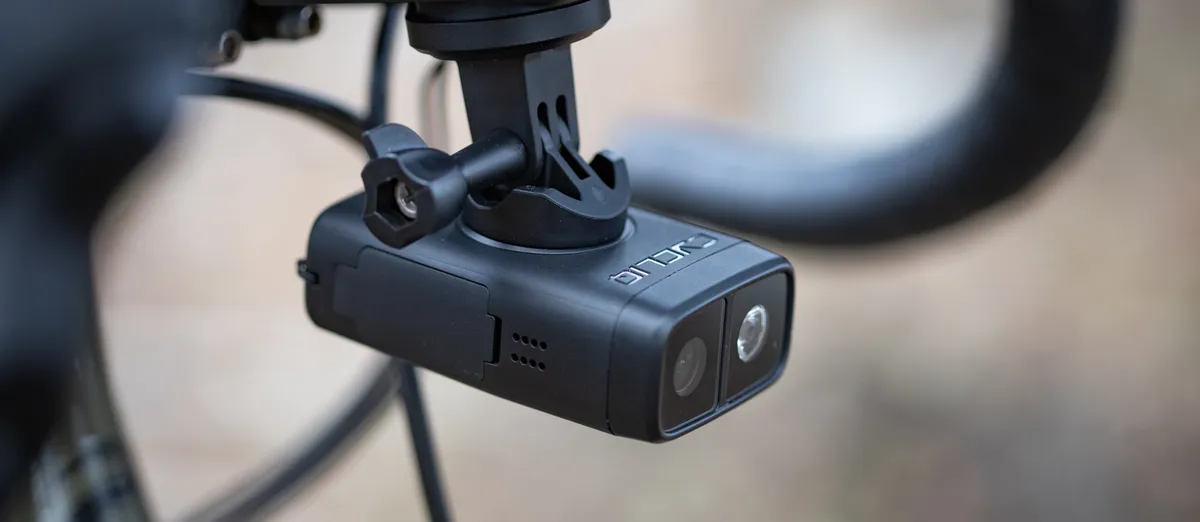
If you want to record your mate being taken out by a kangaroo, the Fly12 will capture it (as long as they’re riding in front of you). It offers similar functionality to the Fly6 Pro rear camera listed below, and also incorporates a front light, although it lacks some of the advanced features found on the best action cameras, such as horizon lock, wireless data transfer or integrated editing tools. Your footage is simply stored on a Micro SD card.
The Cycliq Fly12 does include image stabilisation and offers an impressive runtime of up to seven hours, which makes it particularly appealing for cyclists. It can be mounted either above or below the handlebars and the footage can be overlaid with Strava data. The configuration of both the light and the camera is handled through the companion app, although there’s no direct control from a cycling computer.
The light output is now 400 lumens, reduced from the previous 600 lumens. That may feel a little underpowered for night riding, but it's likely sufficient as a daytime running light. On the plus side, the camera resolution has been increased. At 148g, however, the Fly12 is relatively heavy.
We’ve also reviewed the similar Garmin Varia Vue, which records in 4K. However, we weren’t impressed by the battery life and encountered some software glitches, and it’s also quite expensive.
If you are looking for a matching rear camera, then Cycliq also sells the Fly6 Pro, which combines a 4K camera with a 100 lumen light to capture footage from behind.
You can read our full Cycliq Fly 12 Sport review for more details.
How to choose the best action camera for cycling
Here are the considerations that we think are important when choosing the best action camera for your needs. Read our FAQs further down this page if you want more detail.
- What video quality does it support? Most action cameras now support 4K or more, but a cheaper one may only shoot in 1040 HD. That may be fine, depending on what you want to do with your footage.
- What frame rates can I select? If you want slo-mo, you'll need the option to shoot at 120fps or 240fps.
- Is there good image stabilisation? Bikes bounce around, so some form of image stabilisation is definitely useful if you want good image quality.
- How is low-light performance? If you're planning to shoot year-round or early or late in the day, you'll want good light sensitivity.
- Is there an editing suite? If you plan to edit your footage, make sure there's a decent editing suite that supports your needs or that you can find one to suit. As with the camera itself, there are degrees of sophistication, so make sure you have the functionality you expect to use.
- What's the battery life? Many action cameras have shortish battery life, particularly if you want to shoot in high definition, so make sure that your battery will last long enough for your needs.
- Can I swap in a spare battery? Many, but not all, action cameras allow you to sub in a second battery if the first runs flat. You may find this handy, although it's another extra cost item to buy.
- What memory capacity can it support? If you want to shoot in 4K or greater, you'll soon fill up a Micro SD card or internal memory. You can buy cards with 1TB of memory, but can you use them in your camera? Also, make sure your card is fast enough for video capture by checking its video class.
- What are the mounting options? Most action cameras can be used with a variety of mounts for your bike and you, but make sure that there's something available to support your plans and check the price.
- How easy is it to mount to my bike/me? How easy is it to use the mount? Do I need other parts, such as an out-front mount with a GoPro adapter?
- How weatherproof is it? If you're out in the rain or on muddy paths, you'll probably want IPX6 or better ingress protection.
- Is there a remote? A remote can be handy to stop and start recording and preserve your camera battery.
- What does it weigh? Most cyclists want low weight, so bolting a chunky action camera to their bike may not be a good idea.
- What does it cost? Finally, keep an eye on the price. This can soon rise if you need to add extra batteries, mounts, camera protection and more.
Everything you need to know about the best action cameras for cycling
What video quality do I need?
Action cameras have been capable of shooting in full HD for a while now and almost all are now able to record 4k video or better. If you want to record slow-motion action, look for cameras with high frames per second (FPS) settings; 240fps will allow footage to be slowed down by 8x, and even budget cameras will allow at least 2x.
With the rise in popularity of vlogging and producing video edits, high-end cameras offer advanced features to achieve the highest quality. Higher quality optics, stabilisation and audio make a huge difference to a video’s quality as well as the ability to record in advanced log format. Log formats such as GoPro’s Protune or DJI’s D-LOG settings capture more data and allow greater flexibility when editing in post-production.
On the minus side, 4k video takes up a lot of storage space, so you'll need a large memory card, possibly with a backup. Runtimes may be short due to the battery too, so you may need a spare. Full HD still offers adequate resolution for many purposes and may increase your shooting time.
Do I need image stabilisation?
There have been several big advances in stabilisation recently as camera manufacturers try to smooth footage to make content shot in bumpy environments, including when cycling, more watchable.
Optical stabilisation offers the best results, however electronic stabilisation, such as GoPro’s HyperSmooth is very capable of removing the camera shake effectively. Even budget cameras are starting to include image stabilisation, although do not expect the same results as the top-of-the-range models.
Should I get a touchscreen camera?
A touchscreen is the most popular method of control and allows easier shot framing, menu navigation and video replay. However, touchscreens are useless in environments that are very wet or require gloves.
If you ride in all weather, it's worth considering whether important shooting modes are still accessible through buttons. You may have the option of a remote.
Should my camera connect to an app?
Most camera manufacturers offer a mobile phone app that allows remote camera control, video playback and uploads to social media. Some apps have editing features to combine clips and add music before uploading, allowing quick edits to be shot, edited and uploaded without needing a computer.
Where should I mount my camera on my road bike?
This all depends on what you're trying to achieve, but generally, the most common places to mount an action camera are on the handlebars or beneath the saddle.
Depending on how much real estate you have up front, you may want to opt for an upside-down mounting, which doesn't usually affect the footage.
Many out-front cycling computer mounts can be fitted with a GoPro mount on their underside, which most action cameras from other brands can also use.
Filming at the front of your bike allows you to capture the open road, whereas filming at the back will allow you to capture footage of your friends and fellow riders, as well as approaching passing drivers.
Helmet mounting gives a higher vantage point and should also keep the lens cleaner if you're riding in dirty conditions or taking to gravel trails. A chest mount is popular for mountain bikers and might work for gravel, but the position adopted by road riders means that you may just get some great footage of your stem.
Many action camera brands sell a selfie stick to fit their cameras. It's a great option if you want a drone-style view without actually buying a drone and some are 'invisible' so they don't show up in the footage.
If you mount it to your bike, good image stabilisation will be critical, while if you hold it, you're going to be limited to short, easier runs which you can ride one-handed.
How do we test the best action cameras?
We take a structured approach to testing at Cyclingnews. Items for review are requested from suppliers and assessed for ease of set-up and photographed.
Then we're out on the road or trail, seeing how easy they are to operate in a range of conditions. We'll review them over a period of weeks to see how we get on with them and how well they function in real-world riding, drawing up our conclusions along with a detailed scorecard to support them.
Read our How We Test page for more.

